Skip to content

HOLODRIFT GRANULAR, SPECTRAL & WAVE CROSSFADING SYNTHESIS.

159€ 119€*

  • AU/VST3/CLAP
  • STANDALONE
  • MAC OSX
  • WINDOWS

* Launch price valid until October 30, 2026 November 30, 2026 with code L4UNCH

01

THE CONCEPT

Unique & original synthesis concept. Draft timbral scenarios with a wave-crossfading engine, use a complete family of frequency-domain effects in real time, with any sound.

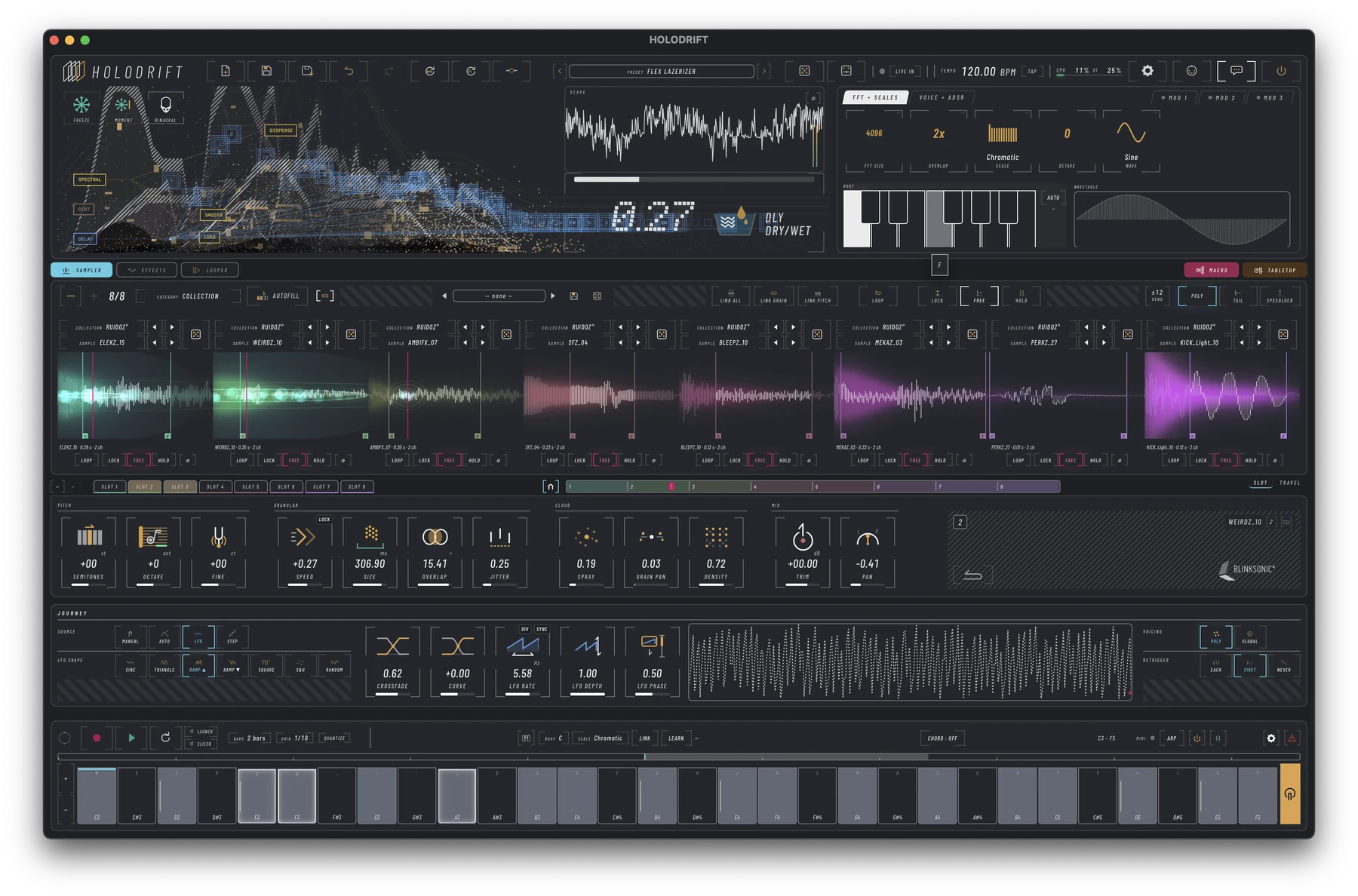
HOLODRIFT brings a granular sampler and a spectral engine together. Eight slots, each a complete granular engine, hold your sounds: samples, loop slices, recordings, live input. The JOURNEY, a position gliding from slot to slot, melts one material into the next. Drive it by hand on the XY pad, or let it move on its own, by LFO or note by note. Everything the sampler plays flows into the spectral engine, which analyses it continuously, partial by partial, then rebuilds it. In WAVE mode, each partial is replayed by a wavetable of your choice: the notes and gestures remain, the material changes.

A complete granular engine, eight times.

Each slot holds a sound: a whole sample, a slice of a loop, a recording, a file of your own.

Each slot reads its sound through a stream of grains, from a few milliseconds to a second long.

Slow it down, stop it, run it backwards. Stretch it without changing its pitch, scatter it into a cloud, tighten it into a buzz.

  • AUTOFILLOne burst fills the eight slots at random, from the category of sounds you chose.
The sampler: the eight slots and the SLOT page

Sounds, fill all eight in one gesture.

Samples ready to play from the start, in sixteen collections.

The LIBRARY lays sounds out on a map, by timbre: neighbours sound alike. Draw a lasso around a region: the eight slots are filled.

Pads, keys, plucks, bells, voices, basses, hits, noises and soundscapes, from the BLINKSONIC° instruments and beyond.

Browse by collection or by tag: twenty-eight of them, already suggested, and yours to edit.

Two views: the MAP, by timbre, and the LIST, by name, tag and collection.

The LIBRARY, MAP view: sounds placed by timbre A lasso drawn on the map The LIBRARY, LIST view The USER tab: your own collections

Bring your own sounds.

Drop an audio file on a slot: it plays at once.

Or drop it into the LIBRARY, in a USER collection: build as many as you like with ADD, and tag them your way.

IMPORT files into a collection, REC what HOLODRIFT plays: RECORDED keeps every take.

Shared presets bring their sounds with them.

SLOT 1 · DROP A SAMPLEWAVFLACMP3WAVAIFFFLACMP3OGG

Read each sound your way.

Each slot chooses how the journey reads it.

  • LOCK: the playhead follows the journey. Eight slices of a loop become one instrument.
  • FREE: the sound runs at its own pace; the journey only sets the crossfade.
  • HOLD: the playhead freezes, and the grains hold the sound where it stands.
  • LOOP: in every slot, set your own loop points.

And the line can shrink: from eight slots down to one. Fewer slots, wider slots.

One slot, at the size it takes when there are four
02

THE JOURNEY

One position, travelling.

The JOURNEY is the heart of HOLODRIFT: it drives the crossfade from one slot to the next.

The JOURNEY is a position on the line of slots. You hear the slot it stands on.

When it crosses a boundary, that slot melts into the next. At zero the slots cut; at one, the whole journey becomes one long fade.

Try it: eight sounds of the LIBRARY, in LOCK, crossfade at its widest.

  1. Kalimba
  2. Carillon
  3. Pad
  4. Choir
  5. Stream
  6. Friction
  7. Sub swell
  8. Atmo

Hold the handle and travel. Stop, and the sound freezes.

Ways to drive it.

By hand, or let it move on its own.

  • MANUAL: the POSITION strip, the XY pad or the mod wheel; a recorder loops your gesture over one to sixteen bars.
  • AUTO: each slot held for the time its weight gives it.
  • LFO: seven shapes sweep the part of the line you choose.
  • STEP: each note moves to the next slot, or to a random one.
JOURNEY in MANUAL JOURNEY in AUTO JOURNEY in LFO JOURNEY in STEP
The TRAVEL page of the global view: XY pad, WEIGHT bar, INERTIA, Y setting

One finger, one journey.

On the XY pad, X drives the JOURNEY. Y carries any setting of the instrument.

SCRUBTouch it and a note plays. One gesture, two moves: it scrubs through the grains and crossfades between the slots.

In the end, the eight slots compose one single sound file.

Shape the trip: under the pad, the WEIGHT bar shows each slot’s share of the journey. Drag a boundary to widen a slot. Move the slots to change the order of the trip.

INERTIA

In MANUAL mode, INERTIA sets how the cursor follows your finger across the whole pad.

From EAGLE, 80 milliseconds, to SNAIL, a full minute.

  • EAGLE80 ms
  • CHEETAH0.3 s
  • HARE1.2 s
  • HEDGEHOG4.5 s
  • TORTOISE16 s
  • SNAIL1 min
03

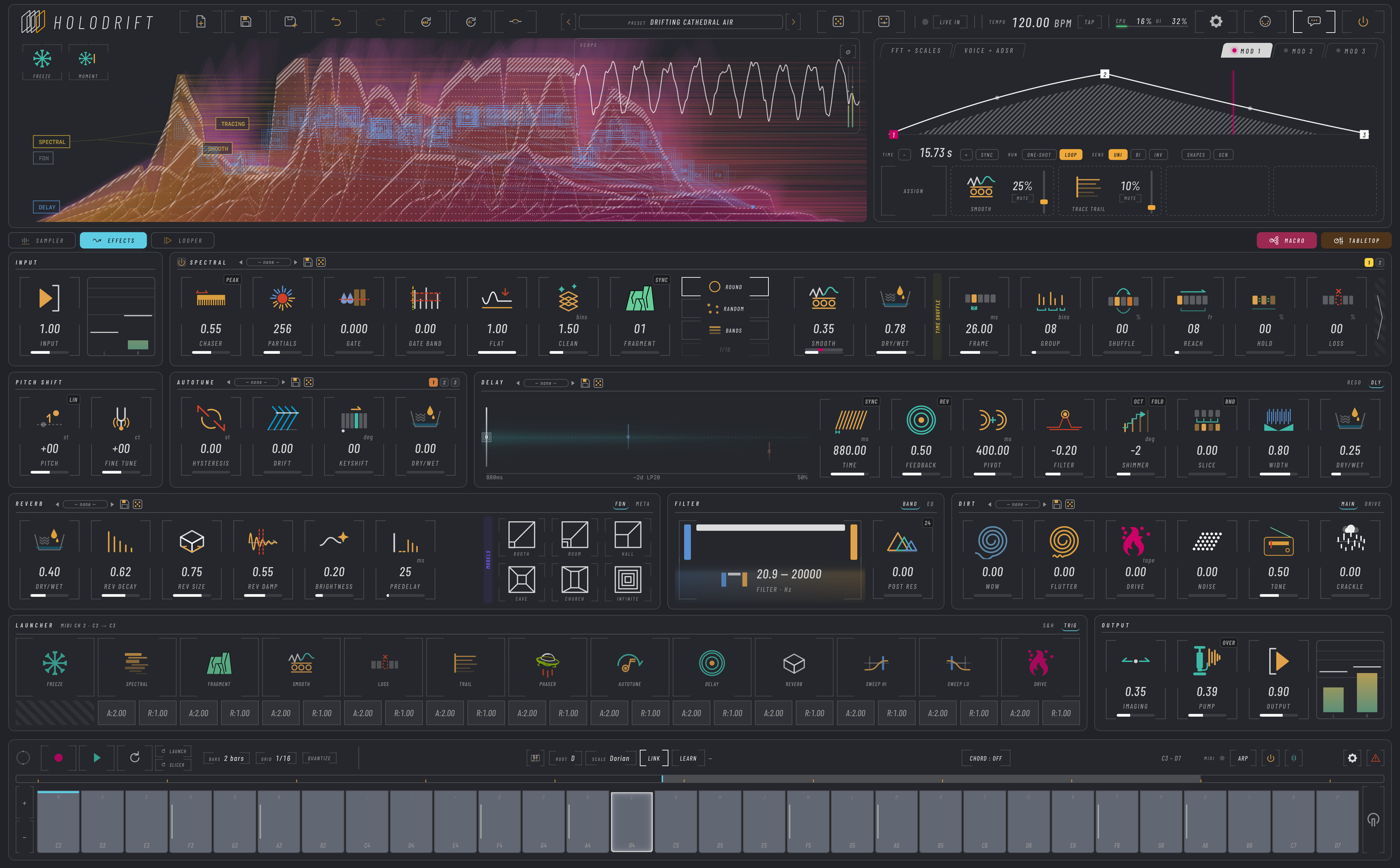
THE EFFECT CHAIN

Where sound changes its nature.

Everything the sampler plays flows into the spectral engine.

It listens continuously, as you play: the sampler, the live input, your chords, your gestures. It breaks the sound into partials, then rebuilds it.

The visualizer: the partials, live
IGNITER 01
DRY0:09
WET0:18

Smeared, biting, alive.

Not the purest method (although…). Surely the most original.

Real-time resynthesis brings roughness and raw intensity: a little-explored harmonic saturation. It dirties everything, and stays organic.

Musicians call that bite GRIT. HOLODRIFT serves it by the bucket.

The visualizer, ACID LEMON GROWL
CLAOR INSTINCT
DRY0:06
WET0:15

Blur time. Freeze it.

FRAGMENT, SMOOTH and TRACING blur in time, partial by partial.

FREEZE holds the spectrum where it stands.

The visualizer, GYPSY DROID MELLOW
STELLA ROID
DRY0:09
WET0:12

Every frame, reshaped.

Between analysis and rebuild, HOLODRIFT works on every frame.

  • CHASER

    The width of the analysis window: wide and clean, or narrow and grainy. The lo-fi comes from here.

  • PARTIALS

    How many partials are rebuilt: a filter on the whole spectrum.

  • FLUID GATE

    An absolute spectral gate: every partial under the threshold, gone.

  • FLAT

    The loud partials brought down to the quiet ones: dense and even.

  • CLEAN

    Rejects the bins that will not settle: from noisy to pure.

  • FRAGMENT

    Only one partial in N takes new values: chopped, frozen, stretched.

  • SMOOTH

    Every partial smoothed, in pitch and level: liquid, then frozen.

  • FREEZE

    The spectrum stops and hangs, as liquid as SMOOTH made it.

  • TIME SHUFFLE

    The frames reordered in time: granular, on the analysis itself.

  • LOSS

    Frames dropped at random: holes in time, a broken signal.

  • DISPERSE

    A partial pushed out of its pitch, into its neighbours: it smears.

  • TRACING

    Partials kept or dropped by strength, then given a tail.

  • SCRAMBLER

    Two partials trade their pitch.

  • PHASER

    One notch per partial, on the octave axis.

  • BAND

    The stretch of spectrum the chain may touch; the rest stays clean.

Every partial, a wavetable.

By default, HOLODRIFT rebuilds with sines. In WAVE mode, each partial becomes a full copy of the wavetable.

Notes, chords and attacks remain. The material changes. The source becomes a score; the wavetable performs it.

FFT + SCALES: the wavetable that replays each partial

Harmonics, any wavetable you like.

Classic shapes, algorithmic laws, synthetic timbres.

Or a dropped sample: the engine measures it over 128 harmonics and builds a clean, band-limited table. IMPRINT lays the file’s formants and resonances over the rebuilt partials.

128 harmonics, times an endless choice of waveforms: an engine for unheard timbres, reshaping any input in real time. Play a SAW from the live input of a guitar.

The WAVEFORM list

And the rest of the chain.

After the spectral engine, eight more sections shape the sound.

  • PITCH SHIFT

    Moves the whole retuned result, in steps or in a straight line.

  • AUTOTUNE

    Polyphonic by nature: each partial snaps to the nearest note of one of 24 scales, or your own. No pitch detection.

  • RESONATOR

    Sixteen strings tuned to the scale, ringing like sympathetic strings.

  • DELAY

    Inside the FFT engine: it delays partials, not audio. Repeats that climb the scale, play backwards, shimmer.

  • REVERB

    Two machines: FDN, from booth to infinite; META, drifting, with EROSION wearing the tail away.

  • FILTER

    A resonant band filter, 12 or 24 dB per octave, or a three-band EQ with four memories.

  • DIRT

    A tape machine, wow, flutter and nine saturation models, over a bed of noise.

  • OUTPUT

    Stereo width, PUMP, a three-band compressor, and level.

04

ENDLESS LOOP

GRANULAR: feed the sampler.

Record what HOLODRIFT plays, or open a file: the loop is cut into as many slices as there are slots, and AUTOFILL sends them there.

Edit each slice by hand, drag a span into any slot: a sliced loop spreads across the eight slots in two gestures.

It is also a simple loop and playback player.

And it is where the recorder lands: every take, ready to slice.

ALWAYS LISTENINGNOWCAPTUREthe last 1–32 bars or 1–60 sRECFIXED · 1 to 60 sOPEN · up to 5 minutes→ WAV, 32-bit float, into RECORDED

SLICER: remix the output.

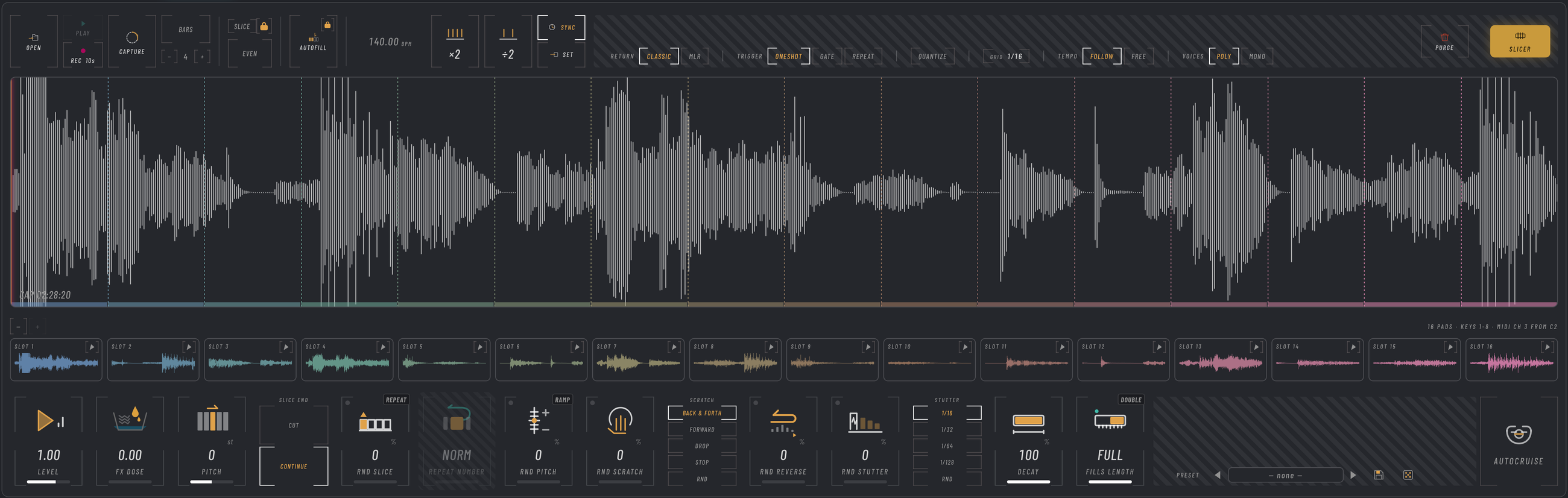
Whatever plays, the SLICER recycles it: up to sixteen pads, played by hand, by MIDI, or by AUTOCRUISE, in time.

A buffer listens all the time: press CAPTURE, and the last bars, or seconds, are yours to remix.

Slice by slice, probabilities do the remix: RND SLICE and its REPEAT, RND PITCH, RND SCRATCH, RND REVERSE, RND STUTTER.

Almost a third instrument: it plays alongside the sampler, and goes back into the effect chain. An endless loop…

  • CAPTURE
  • AUTOCRUISE
  • RND SLICE
  • RND PITCH
  • RND SCRATCH
  • RND REVERSE
  • RND STUTTER
The LOOPER in GRANULAR mode: a span picked on the waveform, dragged into a slotThe LOOPER in SLICER mode, with AUTOCRUISE

GRANULARSLICER

05

AROUND IT

Presets, ready to go.

240 presets, in thirteen banks.

They explore the HOLODRIFT principle in every direction: texture hunting, but above all timbral scenarios and sound phrases of every kind: pads, beats, SFX, soundscapes…

The PRESETS window

MACRO: eight settings, one screen.

Eight settings of your choice around the visualizer and its mirror.

Play them without opening a single tab.

Perfect for exploring presets, or for working in a minimal format inside your DAW.

The MACRO view, dark themeThe MACRO view, light theme

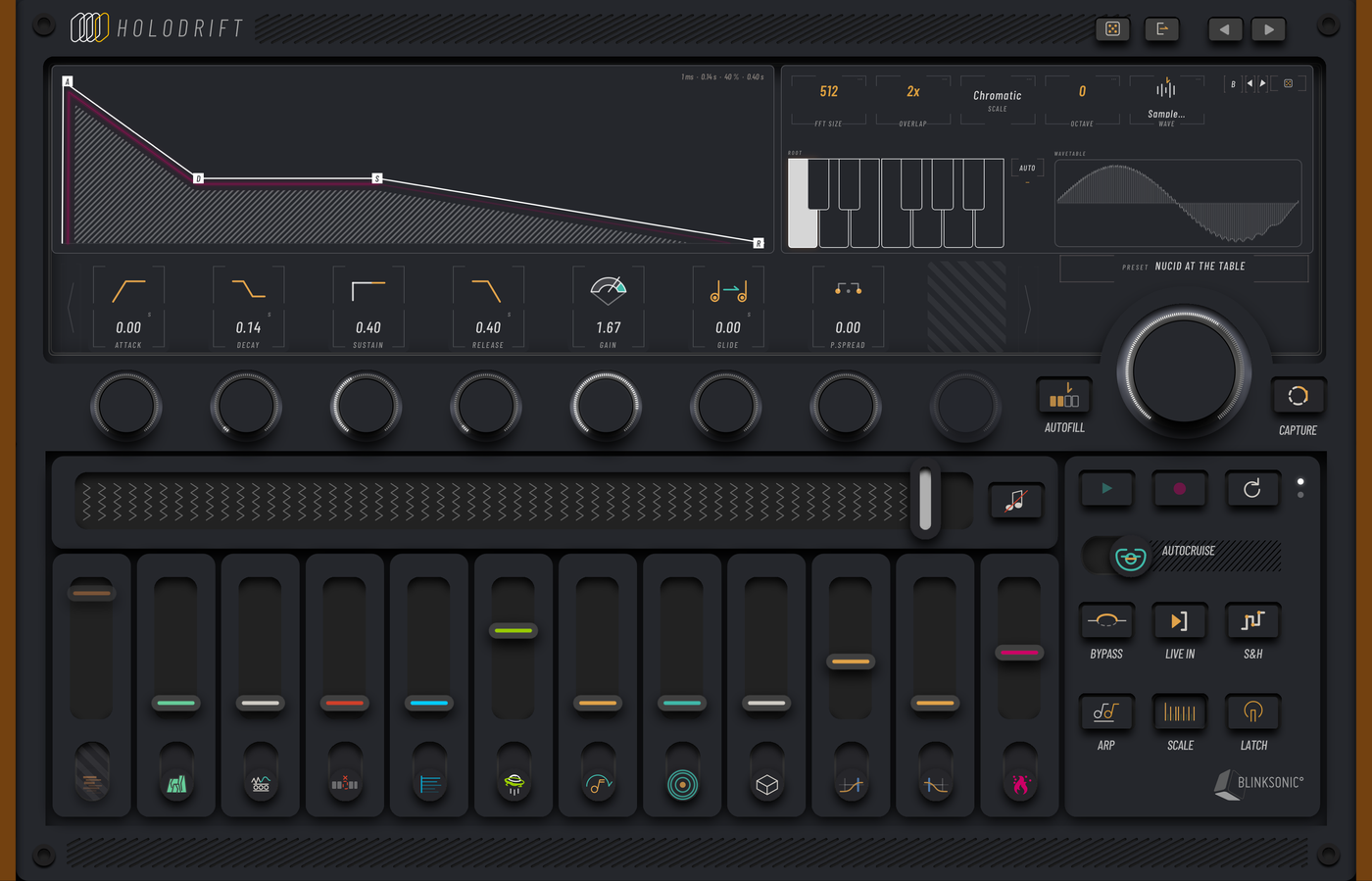
TABLETOP: one chassis.

A big knob for presets, eight knobs, twelve trigger faders.

The looper, ARP, SCALE and BYPASS, within reach.

A view built for quick performance: as if HOLODRIFT were a real machine.

TABLETOP, NUCID AT THE TABLE TABLETOP, ACID LEMON GROWL TABLETOP, DRIFTING CATHEDRAL AIR TABLETOP, the SAMPLER screen TABLETOP, the FFT + VOICE screen TABLETOP, the JOURNEY screen TABLETOP, the LOOPER screen
06

AND THERE’S MORE…

Launch the effects.

The LAUNCHER pushes the effects around, for a moment.

TRIG: twelve buttons played by hand, by MIDI or from the number row of your keyboard, each with its own attack and release. In TABLETOP, they are twelve faders.

S&H: a random clock fires them for you, at the speed and probability you set.

The twelve TRIG faders of the TABLETOP viewThe LAUNCHER in S&H mode
▶

HEAR IT

VAPORED and ACOUSTIC FLAVORS.

Played live in HOLODRIFT. Duration: 6:40.

PETALCORE BOTANICA.

Played live in HOLODRIFT. Duration: 7:22.

FREAK SHOW.

Played live in HOLODRIFT. Duration: 4:59.

WEIRD BEATS.

Played live in HOLODRIFT. Duration: 4:55.

MICROCOSMIC.

Played live in HOLODRIFT. Duration: 7:02.

GRAINS N RESONATORS.

Played live in HOLODRIFT. Duration: 9:03.

■

SPECIFICATIONS

THE SOUND

  • Granular sampler: 8 slots, 4 voices · SPEED, SIZE, OVERLAP, JITTER, SPRAY, GRAIN PAN, DENSITY · LOOP, LOCK, FREE, HOLD · TAIL, SPEEDLOCK · POLY or MONO with GLIDE
  • JOURNEY: MANUAL with a gesture recorder (1 to 16 bars), AUTO, LFO (7 shapes), STEP · CROSSFADE and CURVE · POLY or GLOBAL voicing
  • XY pad: scrub and crossfade · Y on any setting · INERTIA, six speeds from 80 ms to 1 min · WEIGHT bar
  • Real-time spectral engine: FFT 256 to 4096, overlap 2× to 8× · 15 spectral families
  • WAVE: 21 waveforms or any sample, 128 harmonics · IMPRINT · HARM FOCUS and ENERGY
  • AUTOTUNE, polyphonic, 24 scales and your own · PITCH SHIFT ±24 semitones
  • RESONATOR, 16 combs · spectral DELAY with SHIMMER · REVERB: FDN (6 rooms) and META with EROSION
  • FILTER or 3-band EQ with 4 memories · DIRT: tape and 9 saturation models · OUTPUT: WIDTH, PUMP, limiter
  • LAUNCHER: 12 TRIG and S&H · 3 drawn modulators, 23 shapes, 4 targets each

THE PLAY

  • HOLODRIFT (instrument) and HOLODRIFT FX (effect)
  • LOOPER: GRANULAR or SLICER (16 pads) · always-on CAPTURE · AUTOCRUISE with 5 random tools · recorder up to 5 minutes
  • Keyboard: 30 computer keys, QWERTY or AZERTY · SCALE MAP · LEARN · LINK with AUTOTUNE · 8 chords · arpeggiator, 11 patterns · phrase recorder
  • MIDI LEARN · MIDI clock in · host sync · 265 automatable parameters
  • Routing: LIVE IN, LOOPER and SAMPLER to the effects, dry or the recorder
  • LIBRARY: 1,360 samples, 16 collections, 28 editable tags, MAP and LIST views
  • 240 presets in 13 banks · section presets · .holodrift sharing
  • MACRO and TABLETOP views
  • Dark and light themes, colour or mono · 10 interface sizes · English and Japanese

REQUIREMENTS

  • macOS 13 or later, Intel or Apple Silicon (universal): AU, VST3, CLAP and standalone app
  • Windows 10 or 11, 64-bit, with the Microsoft Edge WebView2 runtime: VST3, CLAP and standalone app
  • A powerful machine: a Mac or a PC from 2022 or later. Mac: Apple M2, M1 Pro or better. PC: Intel Core i7 of the 12th generation or AMD Ryzen 7 5800X, or better
  • 16 GB of RAM · about 1 GB of disk space, with the LIBRARY
  • Screen: 2560 × 1440 or Retina for comfort; 1920 × 1080 at the least
  • A licence runs on two computers at a time; the STUDIO LICENSE, on up to ten

AUDIO FILES

LOAD WAV (16, 24 or 32-bit, any sample rate) · AIFF · FLAC · MP3 · OGG

RECORD WAV, 32-bit float, at your project’s sample rate

SHARE .holodrift: a preset and its sounds in one file

  • AU/VST3/CLAP
  • STANDALONE
  • MAC OSX
  • WINDOWS
?

FAQ

INSTALLATION

Before you install

Your licence key is in your order email. Keep it private: it can be active on two computers at a time (a Studio licence: the number of seats in your order).

A note before you start: the installers are not signed by Apple or Microsoft yet, so your system will warn you once. This is expected; the steps below take you through it.

How do I install HOLODRIFT on macOS?

macOS 13 or later, Intel and Apple Silicon.

  1. Double-click HOLODRIFT-1.0.0-….pkg.
  2. If macOS says the installer cannot be verified, click Done, open System Settings > Privacy & Security, scroll down to the message about HOLODRIFT and click Open Anyway, then confirm with your password. (On macOS 15, right-click > Open no longer works: this setting is the only way.)
  3. Follow the steps. The application goes to Applications, the instrument and the HOLODRIFT-FX effect (AU, VST3, CLAP) to Library > Audio > Plug-Ins, and the sounds and presets to Users > Shared > HOLODRIFT.
  4. The first time you open the application, macOS asks for microphone access. Click Allow: HOLODRIFT uses the input only for LIVE IN, recording and CAPTURE, and never sends audio anywhere.
  5. If your host does not list HOLODRIFT, rescan your plug-ins (Logic Pro scans new Audio Units on its next start).
How do I install HOLODRIFT on Windows?

Windows 10 or 11, 64-bit.

  1. Run HOLODRIFT-1.0.0-Windows-x64.exe.
  2. If Windows shows "Windows protected your PC", click More info, then Run anyway.
  3. Follow the steps. The application and the VST3 and CLAP plug-ins (instrument and effect) go to their standard folders. Choose "For all users" (recommended) or "Just for me" for the sounds and presets.
  4. HOLODRIFT needs Microsoft Edge WebView2; the installer adds it if it is missing (an internet connection is needed for that step).
  5. In the application, choose your audio driver and device in SETTINGS (Ctrl+,).
How do I activate my licence?
  • Open HOLODRIFT (application or plug-in), paste your key with PASTE, and press REGISTER. The activation is checked online once.
  • To move the licence to another computer, click the HOLODRIFT logo at the top left, then DEACTIVATE on the computer you are leaving.
  • Installed "for all users", the licence belongs to the computer: one activation covers every account on it.

Need help? Write to us on the SUPPORT page.

DEMO & LICENCE

How long does the demo last, and what can I do with it?

Nine days, with everything unlocked. Every fifteen minutes, a short pause reminds you that it is a demo.

What happens when the demo ends?

HOLODRIFT goes silent and can no longer save. Your presets and recordings stay on your disk: register a licence and everything comes back.

On how many computers can I use my licence?

Two at a time. DEACTIVATE, in the credits window, frees a computer for another one. With the STUDIO LICENSE, a single key covers up to ten computers.

Do I need an internet connection?

Once, to register your key. HOLODRIFT then works offline.

Can I resell or transfer my licence?

No: the licence is personal and cannot be transferred. All purchases are final. The details are in the HOLODRIFT licence agreement.

TECHNICAL

Which formats and systems?

macOS 13 or later, natively on Apple Silicon and Intel: AU, VST3, CLAP and a standalone app. Windows 10 or 11, 64-bit: VST3, CLAP and a standalone app. No AAX, Linux or iPad version.

Which audio files can I load?

WAV, AIFF, FLAC, MP3 and OGG, at any sample rate. The recorder saves 32-bit float WAV.

Instrument or effect?

HOLODRIFT is the instrument: it plays MIDI. HOLODRIFT FX goes on an audio track and plays it through the same chain: the track enters through LIVE IN.

HOLODRIFT does not show up in my DAW.

Rescan your plug-ins. On macOS they live in /Library/Audio/Plug-Ins (Components, VST3, CLAP); on Windows in Program Files › Common Files (VST3, CLAP).

Where are my presets and sounds?

On macOS, in Users › Shared › HOLODRIFT, for every account of the computer. On Windows, in Public › Music › HOLODRIFT if you installed "For all users", or in your own Music › HOLODRIFT with "Just for me". Presets (one file each), library, user and recorded: copy that folder to back everything up.

Is it heavy on the CPU?

The engine analyses and rebuilds the sound in real time, and the visualizer draws it live: a recent machine is recommended. On integrated graphics, set VISUALIZER FPS to 30 and turn BLUR off in SETTINGS.

Which screen size do I need?

1920 × 1080 at least, with the interface at 90 %. 2560 × 1440 or a Retina screen at 110 % is the comfortable size. Ten sizes, from 60 to 200 %.

Can I share my presets?

Yes: SHARE packs a preset and its sounds into one .holodrift file. Drop it on any HOLODRIFT window to import it.

Where is the manual?

The user guide is online: HOLODRIFT USER GUIDE (PDF).

The HOLODRIFT licence agreement is the licence of the software, not the terms of this website.

■

GALLERY

The SAMPLER tab, DRIFTING CATHEDRAL AIR The LIBRARY list, light theme, in Japanese The LIBRARY map over the sampler The MACRO view, light theme, in Japanese The TABLETOP view The MACRO view, GYPSY DROID MELLOW The PRESETS window The SAMPLER tab, effects in view The MACRO view Eight slots filled from the LIBRARY The TABLETOP view The LIBRARY map, over the sampler The XY pad, in the MACRO view The light theme, in Japanese TABLETOP, light theme

Make it yours!

159€ 119€* **

* Launch price valid until October 30, 2026 November 30, 2026 with code L4UNCH
** Taxes included, where applicable.